AO3 News

Post Header

Adobe is ending support for the Flash plugin next year. As a result, the AO3 will no longer be supporting the Dewplayer MP3 player to present audio playback. In the near future, we will convert the code in existing works to use the HTML5 <audio> tag.

While we can automatically make this change for works using Dewplayer, other works may also be affected by the end of Flash. If you have works with audio or video content, we strongly encourage you to change your existing works to use the <audio> or <video> tags as well, or to use updated code from your audio or video hosting site.

What is "Flash" and when does support end?

Flash is an Adobe program that was used to play audio and video on websites across many platforms since the late 1990s. However, it has a history of security vulnerabilities, and technology has provided new ways to do many things that once required Flash.

Many mobile browsers have not supported Flash for several years now, and Adobe has announced they will stop updating and distributing the software after December 31, 2020. They will also block it from playing any content after January 12, 2021.

For more information, please refer to Adobe's Flash Player End-of-Life Information Page.

How does that affect the AO3?

The Dewplayer plugin, a Flash-based mp3 player that we have used for podfic and other audio fanworks, will no longer function. Some older embed codes provided by other audio or video hosting sites will also stop working. For example, YouTube videos embedded before they switched to <iframe> tags in 2017 may stop working.

If you have any works with embedded audio or video, we recommend checking to make sure the audio or video still plays after January 12, 2021. If it doesn't, please make sure you are using the latest embed code from your hosting site, or consider switching to the audio or video HTML tags.

What happens to existing works using Dewplayer?

We will in the near future run a process on the AO3 to find works posted using the Dewplayer plugin and automatically convert the relevant HTML to use the <audio> tag.

Can I still use Dewplayer after December 31?

No, Adobe expects that major browsers will disable Flash after this date, so Dewplayer will be non-functional. We will eventually be removing our copy of the Dewplayer code entirely. We are also developing a change to the HTML sanitizer that will strip out any new attempts to use Dewplayer and replace it with HTML <audio> tags.

Can I fix my works myself?

You can manually edit the code yourself.

  1. Navigate to the work and select Edit.
  2. In the HTML view, look for the section of code that says
    <embed type="application/x-shockwave-flash" flashvars="mp3=AUDIO_URL" src="https://archiveofourown.org/system/dewplayer/dewplayer.swf" width="200" height="27" allowscriptaccess="never" allownetworking="internal"></embed>
  3. Copy the AUDIO_URL part. This will be a full URL that ends in ".mp3".
  4. Delete the code and paste in
    <audio src="AUDIO_URL"></audio>
  5. Replace the AUDIO_URL with the link you copied in step 3.
  6. Repeat this for any other embedded audio tracks in the work and select Update at the bottom of the page.

You can also use more complicated attributes and settings that are listed in the Embedding with the Audio and Video Tags news post.

How do I post new audio or video content now?

If you are using embed code from your video or audio hosting site, you should be able to paste it in using the HTML editor. If your embed code comes from a site not listed at "What sites can I use for hosting multimedia files?", please contact Support regarding getting your site added to the permitted list.

If you would like to use HTML <audio> or <video> tags, you can do so using the information and settings listed in the Embedding with the Audio and Video Tags news post.

If I have any questions?

You can get more information on using these elements and their attributes in these articles from Mozilla Developer's Network:

If you need more help, please submit a Support request.
Comment

Post Header

In the next few days, we'll be making a small change to the way images are displayed in fanworks. To make the Archive friendlier for smaller screens, we're updating the default display of images to ensure they won't be any wider than the full width of your screen.

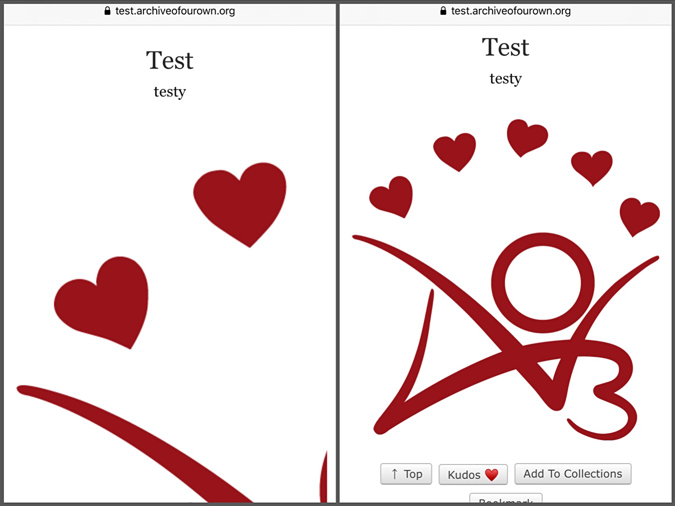
Before and after: A work with the AO3 logo partially cut off on the right side, and with image resized so the full image fits on screen.

This change will apply to both new and existing works, and it's being done using CSS. That means it only affects how the image is displayed on the Archive -- the image files themselves are not being modified.

If you're an artist and you'd like to make it easier for others to view your art in a larger size, we recommend providing a link to the full size image. Our FAQ describes how to make a link with HTML, or you can use the link button on our rich text editor.

Art lovers who'd like to view an image at full size, your browser can probably help! The directions will vary depending on your device and browser, but generally, you can right-click (or your device's equivalent) on an image to open a menu, which should have an option for opening the image in another tab or copying the image's web address, which you can then visit. For more detailed instructions, we recommend going to your favorite search engine and searching for "open image in another window" and the name and version of your browser, operating system, or device.

Comment

Post Header

Published:
Thu, 07 Nov 2019 08:36:14 +0000
Tags:

We're excited to announce we've recently added support for the <audio> and <video> HTML elements! With this change, you'll be able to use these tags to embed your self-hosted audio or video fanworks on AO3.

Unlike the Flash-based audio player we already offer, these new elements will work in all modern browsers, and they will continue to work even after Adobe ends support for Flash in 2020. (While we have no plans to remove Dewplayer at this time, we strongly recommend updating to the <audio> tag.)

Basics

There's still a lot of design, policy, and coding work to do before we can host audio and video files, so for now you'll need to upload your files to your own web space. Once you've done that, you can embed the file in your work with a small bit of HTML:

  • <audio src="AUDIO URL"></audio>
  • <video src="VIDEO URL"></video>

That's all it takes! Exactly how the resulting media player looks depends on the browser being used to access the work. We do, however, make sure that playback controls are available and adjust the width of videos using CSS to ensure big videos will fit on everyone's screens. We also make sure autoplay can't be enabled, and we add the preload attribute to gently suggest browsers save bandwidth by not loading the full file until you press play.

Complex examples

If you'd like to do something more complex, we support that as well. For example, you can include a poster for your video using the poster attribute (poster doesn't work for audio, but you can still include an image above your audio player):

<video src="VIDEO URL" poster="IMAGE URL"></video>

Because some older browsers don't support these elements, you can also include fallback text on either element to provide a download link:

  
<audio src="AUDIO URL">
  <p>Your browser doesn't support streaming with the HTML5 audio tag, but you can still <a href="URL">download this podfic</a>.</p>
</audio>

Because different browsers support different file formats, you might want to use the <source> element to include multiple formats.

  
<video>
  <source src="WEBM VIDEO URL" type="video/webm">
  <source src="MP4 VIDEO URL" type="video/mp4">
</video>

If you'd like to include captions or subtitles to improve the accessibility of your media file, you can do that with the <track> element:

  
<video>
  <source src="VIDEO URL" type="video/mp4">
  <track src="SPANISH SUBTITLE URL" kind="subtitles" srclang="es" label="Spanish" default>
  <track src="ENGLISH SUBTITLE URL" kind="subtitles" srclang="en" label="English">
</video>

List of allowed tags and attributes

Here is a full list of the tags we've added support for and which attributes you can use on them.

<video> element

  • class attribute
  • dir attribute
  • height attribute
  • loop attribute
  • muted attribute
  • poster attribute
  • src attribute
  • title attribute
  • width attribute

<audio> element

  • class attribute
  • dir attribute
  • loop attribute
  • muted attribute
  • src attribute
  • title attribute

<track> element

  • default attribute
  • kind attribute
  • label attribute
  • src attribute
  • srclang attribute

<source> element

  • src attribute
  • type attribute

You can get more information on using these elements and their attributes in these articles from MDN:

Edit November 8 at 07:53 UTC: If your audio or video file isn't loading on the Archive, you probably need to enable Cross-Origin Resource Sharing (CORS) on your website. Your web host's documentation or support department should be able to help.

Comment

Post Header

If you have podfic, fanvids, or other works with embedded media, users who currently opt to browse the Archive over HTTPS (e.g. via a browser extension) may be unable to access your work. Before we move the Archive to HTTPS, we'll be making some changes to existing audio and video embeds to prevent more widespread issues, but there are also steps you can take now to ensure your content loads for everyone.

The problem

Many of the media players in AO3 works use HTTP links to embed Flash files for playing back audio or video. For example, here's the code for an audio player that uses an HTTP URL as its src:

<embed type="application/x-shockwave-flash" flashvars="mp3=MP3_FILE_URL" src="http://archiveofourown.org/system/dewplayer/dewplayer.swf" width="200" height="27" allowscriptaccess="never" allownetworking="internal"> </embed>

If someone uses HTTPS to access a work with code like that, their browser will notice a mismatch between the page they're on (HTTPS! secure!) and the content it's being asked to display (HTTP! not secure!). When this happens, many browsers will err on the side of security: they won't load or display the embedded media.

Most browsers do allow users to override this behavior and display insecure content, but how easy that is varies a lot from browser to browser, and the process can change from one browser version to the next. (A web search for "display mixed content" plus the name and version of your browser should provide the information you need.) Whenever possible, it's easier -- and safer -- to tell the browser to load the file over HTTPS.

What you can do

To help the browser out, you can simply add that little "s" to the relevant bit of your embed, which will create a secure connection to the file in question. The vast majority of our whitelisted multimedia players already offer HTTPS support. If you only have a few works with audio, video, or even image content which link to external media, you can edit your works, look for the src part and turn the http bit into an https. That's it!

This will ensure that everyone can access your podfic, fanvid, art, or other media, even if they're browsing the Archive in HTTP mode. (Browsers are cool with that mismatch.)

What we will do

Since we can't expect all our users to edit all their multimedia works by hand, we will ensure that all embeds use the correct linkage by doing one big find-and-replace on our end. Because we only allow embeds from a few sites, we can easily find the affected works by searching our database for specific HTML. Then we can run a few simple commands to update the embed code's src from http to https.

This will not touch the content of your work in any way, or alter anything about your work that isn't neatly bracketed by a pair of very specific quote marks. When it's all done, your content will be accessible to users browsing the Archive in secure mode, if it wasn't before. \o/

We are planning to do this on October 4th, right before we switch to HTTPS mode on the AO3.

To make sure that works posted from now on won't run into this problem, we've updated our code to ensure embeds use https links where available, and edited our documentation for audio player embeds.

Edit 09:24 UTC on 05 October, 2017: The update to embedded media files has been completed, but attempts to move the Archive to HTTPS were unsuccessful. HTTP will remain the default for a little while longer, and we'll update you via our Twitter account when we're ready to try again.

Edit 19:16 UTC on 12 October 2017: We successfully made the switch to HTTPS for a few days; however, the extra strain from encrypting all traffic proved too much for our servers at peak times. Until we have installed additional servers (coming soon!), HTTP will remain the default protocol. (Of course, you can still elect to use a secure connection, e.g. via a browser extension like HTTPS Everywhere.) Please follow @AO3_Status on Twitter for futher updates.

Edit 22:15 UTC on 14 October 2017: We have implemented the caching needed to reduce server strain and are currently back on the secure protocol by default. We believe we'll be able to remain on HTTPS, but if it proves too much, we will switch back until our new frontend servers arrive.

Edit 18:28 UTC on 19 March 2018: We have successfully installed our new frontend servers and are now permanently enforcing HTTPS on the Archive. \o/ We still provide HTTP access via insecure.archiveofourown.org.

Comment

Post Header

Published:
Tue, 07 Oct 2014 17:23:45 +0000
Tags:

OTW Announcement Banner by Diane'

The OTW's Fan Video & Multimedia Committee and Legal Committee are once again working to petition for a DMCA exemption granting vidders, AMV makers, and other creators of noncommercial remix video the right to break copy protection on media files. In 2010, we won the right to rip DVDs; in 2012, we got that exemption renewed and expanded to include digital downloads (iTunes, Amazon Unbox, etc.).

This year, we'll not only be pushing to renew the exemptions we've already won in the last two rounds of DMCA rulemaking, but also pushing to add Blu-Ray and streaming services.

And we need your help to do it! If you make or watch vids, AMVs, or other forms of fan video, we need you to tell us:

1. Why making fan videos is a transformative and creative act;

2. Why video makers need high-quality source;

3. Why video makers need to be able to manipulate source (change speed and color, add effects, etc.);

4. Why video makers need fast access to source (such as using iTunes downloads rather than waiting for DVDs);

5. Why video makers need to be able to use Blu-Ray;

6. Why video makers need to be able to use streaming sources; and

7. Anything else you think we should keep in mind as we work on the exemption proposal.

We're also looking for vids that we should add to the Fair Use Test Suite, and we'd love to have your suggestions.

If you have thoughts about any or all of these topics, please send them by e-mail to the Legal Committee at legal at transformativeworks dot org or the Fan Video & Multimedia Committee at fanvideo-chair at transformativeworks dot org. You don't have to use your real name; we can use your name or pseudonym or describe you anonymously as "a vidder" or "a fan video artist."

The DMCA is U.S. copyright law and only directly affects U.S. vidders, but it does potentially have ripple effects outside the U.S.: Strong DMCA exemptions help send the message that fan creativity should be protected everywhere. With that in mind, please feel free to send your thoughts even if you don't live in the U.S.

Also, please help us signal-boost! This info is being posted to all the OTW and AO3 News sites; if you can think of other places the OTW should post, please let us know—and if you can spread the word in your own networks, on streaming sites, etc., please do.

Comment

Post Header

Banner by Diane with the outlines of a man and woman speaking with word bubbles, one of which has the OTW logo and the other which says 'OTW Announcement'

The OTW released a video in April that provides an overview of our work and gives non-fans an introduction to fannish works. Our translation volunteers have now produced captions for the video in the following languages: Arabic, Catalan, Chinese, Dutch, Finnish, French, German, Hungarian, Indonesian, Italian, Polish, Portuguese, Russian, Spanish, Swedish and Turkish.

To enable subtitles in your language of choice on the video below, click on the "CC" button next to the volume and HD options.

All these subtitles are also available on the video we have hosted on YouTube. Just click on the rectangular Captions/CC button in the lower right hand corner of the video and select the language.

If you wish to download a copy of the video with your preferred subtitles, use the links below:

Special thanks to all the volunteer translators who worked on this project!

Our Translation team would also love to have this video narrated in as many languages as possible! Can you help? If you're fluent in a language (or more!) other than English and are willing to help record the voiceover track, please contact us. We'd be thrilled to work with you!

Comment

Post Header

Banner by Diane with the outlines of a man and woman speaking with word bubbles, one of which has the OTW logo and the other which says 'OTW Announcement'

The OTW's April membership drive has officially ended, and we'd like to thank everyone who came out to support it. Your generosity and efforts in spreading the word have made this our most successful drive ever! Since April 3 we've received more than 2,800 individual donations totaling over US$63,000. We've also raised the OTW's membership to at least 4,869 people!

Thank you to all our members, donors, and to everyone who helped spread the word to make this drive such a spectacular success. We’re very grateful for your support! We’d also like to thank all the OTW staffers and volunteers who supported the drive by creating, translating and posting content, responding to donor inquiries, designing graphics, sending e-mail blasts, monitoring donation receipts, and myriad other tasks. Thank you for making the drive possible.

Although this drive is over, we gratefully accept donations throughout the year. This year we also have a very special project to share with you, that you may want to use when telling others why you support the OTW.

Thanks to the amazing vidding skills of Ash48, and the fanwork contributions of dozens of fans, we are proud to present a video introduction to the OTW.

The OTW video explains to people unfamiliar with fandoms and fanworks what it is that the OTW does. It defines transformative works, and provides an overview of our projects as well as an insight into what fans create.

We hope that you'll share the video with fans and non-fans alike. You can find it on YouTube, Vimeo, and Critical Commons, as well as on the OTW website.

The OTW's volunteer translators are currently working on subtitles for Arabic, Catalan, Chinese, Dutch, Finnish, French, German, Indonesian, Italian, Polish, Portuguese, Spanish, Swedish and Turkish. As each translation is completed, we will be sending out tweets and tumblr posts promoting it.

We would also love to have this video narrated in as many languages as possible! Can you help? If you're fluent in a language (or more!) other than English and are willing to help record the voiceover track, please contact us. We'd be thrilled to work with you!

The participation and collaboration of fans everywhere is what keeps the OTW and all its projects going. Thank you for being a part of it!

Comment

Post Header

Published:
Fri, 21 Sep 2012 08:57:31 +0000
Tags:

While we're not yet able to host media types other than text, we're working on making the site more welcoming to multimedia works. As part of this, we encourage users to embed podfics and vids. In 2012, Google implemented server restrictions on their media player embedding solution that many of our users had used to post podfic, causing the works to not play any more. As a stopgap, we looked at several solutions, including continuing to expand our whitelist and locally hosting a copy of the Google code. We wanted, however, to have a more open-source solution that we will be able to fully support going forward, and preferably one without too much adjustment for the users.

After some debate and discussion, we have installed locally on the Archive a copy of Dewplayer, a Flash-based CC BY-ND 2.0 MP3 player. By hosting the player on the Archive, we have better confidence in the safety and security of the code, and because it is licensed under the Creative Commons, we're more confident we can provide this solution for the future.

One of the nice features of Dewplayer is that it by default comes with several different player skins. We recommend the Classic and Bubble skins, and the Volume variations of each. You will still need to have your files hosted on another server for now, though. Once you have the file hosted, just replace MP3_FILE_URL in the code for your favorite player below. (We should also note that several users have reported their browser pasting smart quotes again, so be sure to convert any of those back to normal double quotes!)

Classic

the Dewplayer Classic skin
<embed type="application/x-shockwave-flash" flashvars="mp3=MP3_FILE_URL" src="https://archiveofourown.org/system/dewplayer/dewplayer.swf" width="200" height="27" allowscriptaccess="never" allownetworking="internal"></embed>

Classic with Volume control

the Dewplayer Classic skin with volume control
<embed type="application/x-shockwave-flash" flashvars="mp3=MP3_FILE_URL" src="https://archiveofourown.org/system/dewplayer/dewplayer-vol.swf" width="250" height="27" allowscriptaccess="never" allownetworking="internal"></embed>

Bubble

the Dewplayer Bubble skin
<embed type="application/x-shockwave-flash" flashvars="mp3=MP3_FILE_URL" src="https://archiveofourown.org/system/dewplayer/dewplayer-bubble.swf" width="250" height="65" allowscriptaccess="never" allownetworking="internal"></embed>

Bubble with Volume controls

the Dewplayer Bubble skin with volume control
<embed type="application/x-shockwave-flash" flashvars="mp3=MP3_FILE_URL" src="https://archiveofourown.org/system/dewplayer/dewplayer-bubble-vol.swf" width="250" height="65" allowscriptaccess="never" allownetworking="internal"></embed>

Comment

Post Header

Published:
Tue, 21 Aug 2012 20:22:51 +0000
Tags:

As many AO3 users have noticed, the types of fanwork available through the Archive have been expanding! Unfortunately our current inability to directly host any non-text content has created workaround efforts and these sometimes run into problems.

This has been the case with podfic, and we're particularly sorry that these problems have affected a recent podfic challenge hosted through the Archive. To quickly sum up, this is what has happened:

  • We were allowing people to use Google's audio player as an embed but then Google stopped supporting it so that it no longer worked.
  • We were planning to do our own hosting of Google's player (and announced this in our last newsletter) but decided that we wanted a different open-source solution that we will be able to fully support; we are working on this.
  • We did a quick deploy to enable people in the pod_together challenge to use another audio embed option specifically for that challenge, because they'd been waiting on our fix in order to host their event.
  • We inadvertently enabled our own Google player hosting at the same time. However, this was accidental and has now been disabled - this means it will have broken again for anyone who changed their code to use it. We're very sorry about this.
  • We do plan to offer an alternative solution for podficcers in the near future: this will be a player hosted on the Archive's own servers so that we can ensure it will remain available in future.

Paraka, the pod_together mod who is hosting the player, has generously offered to make it available to people outside the challenge: see this post for streaming code. We should note that this is a small site and is unlikely to be able to support lots and lots of users (also, we can't guarantee it will continue to function long-term) so we recommend that you only take up this option if you have a podfic that you want to post right now (and don't, for example, change your whole back catalogue right now).

We apologize for the confusion this series of events has caused and also about the lack of timely communication in regards to this matter. If you have further questions about audio work on the Archive, please comment here and we will do our best to address them. For specific assistance you may also want to contact Support.

Comment

Post Header

Published:
Thu, 01 Mar 2012 21:13:59 +0000
Tags:

One of the Support tickets we're seeing more of is "How do I post my multimedia works?" It's not yet possible to host vids, art or soundfiles on the Archive, but you can embed works hosted elsewhere, so we wanted to let you know more about how to do that.

All information is current as of November 2019, and is subject to change as we move forward.

Tags and Finding Audio-Visual Works

Right now, the best way to help people find your multimedia works is by adding the information in the Additional Tags Field. The current 'canonical' for audio fics (podcasts, audiobooks, and other such works) is the Tag Podfic, which has subtags for most of the file types (canonicals are the tags which show up in our browsing filters - other variants of the tag are hooked up to that so it finds them all). There is also a Podfic Available tag for authors who have audio versions of their work posted by another author or on another site. We also have a tag for Fanart, with many different subtags.

There is already a lot of video under the Fanvids tag. Some are links to the works posted off-site, but many are embedded in the Archive and can be commented, kudosed, bookmarked, and shared!

We are discussing behind the scenes how to categorize audio/visual media works as we expand this aspect ofin the future, and at some stage will ask for public comment, so keep an eye out for that! Until then, you can use these tags to find your favorite works in new forms, or tag your own works so others can find them!

Posting a New Multimedia Work

Right now, we don't have on-site hosting, so you'll have to host your file at another site such as Vimeo, YouTube, or your own website. You can always just create a link in your work so a user goes to your hosted site, but where's the fun in that? Here's what you need to know if you want to just press play!

Using Embed Code from Other Sites

The HTML Sanitizer we use runs a very tight whitelist on sites we allow to provide media code (this is necessary in order to ensure we don't let malevolent code slip by). If it's not posted to one of these listed sites, the Sanitizer will delete the embed code entirely.

  • archive.org
  • criticalcommons.org
  • dailymotion.com
  • google.com
  • metacafe.com
  • podfic.com
  • ning.com
  • soundcloud.com
  • spotify.com
  • vidders.net
  • viddertube.net
  • vimeo.com
  • youtube.com
  • 8tracks.com

We are currently keeping the whitelist short, evaluating each host site for stability, code vulnerability, content (whether fans are using it), and the size of its user base. (If you know of a site that you think should be on this list, submit a Support ticket and we will submit it for review. This may take a little while, so you may want to use another host in the meantime.)

Some Notes about HTML Code

ETA: We now support the audio and video tags!

There are four ways to embed audio/video in HTML. Currently, we support code starting with the following three tags:

  • <object> - this is the older method that YouTube and Vimeo used to embed video until recently. It's reported to be buggy on iDevices, so use with caution.
  • <embed> - this tag is mostly used for audio, and occasionally to simplify the mess that <object> generates. It's a lot easier to read and compatible with more platforms, so if you have a choice between <object> and <embed>, choose the latter.
  • <iframe> - This is the newest style media embedding tag that we currently support and the most widely accepted for mobile media. Unlike the other tags, <iframe> functions as a separate window within your page to generate the content. This means that a user running NoScript, AdBlock, or similar may have to specifically request to see your media. By default, YouTube, Vimeo, and many other sites will try to give you <iframe>.
  • <audio> or <video> - These are HTML5 tags, and as of November 2019, we now support them! Read more about using them at the announcement post. Note that content using <audio> or <video> are not subject to the whitelist.

If you are writing your own embed code and find a property stripped out that you think should remain, let us know!

Inserting Art

Many websites that host your images will provide the code to embed the image in another site. Just remember that the code has to be posted into the HTML Editor, not the Rich Text Editor. Some sites do provide a lot of formatting in their code. The part you absolutely need to keep is the <img src="... /> portion.

If you prefer to use the Rich Text Editor, you can click on the "Insert Image" icon. You will need the actual link to the image, instead of the whole embed code. It will be something like http://www.host.com/.../image.jpg or http://www.host.com/.../image.png - It has to have the file extension at the end, though!

We currently don't restrict image sources, but there are some tips and tricks, depending on your host site. This is a non-exhaustive list of possible file hosts:

flickr.com
Caution - can be used, but the share link has to be heavily modified to work
dropbox.com
Caution - can be used, but the share link has to be heavily modified to work
deviantArt
Caution - dA's native embed code is removed by the parser, but you can right-click on an image and copy the image URL for the Rich Text editor
tumblr.com, twitter.com, facebook.com
Not recommended - you can right-click to get direct image links, but image links do change over time with no warning. This breaks the image display.
drive.google.com, onedrive.live.com
Not recommended - does not provide direct image links
photobucket.com, imgur.com
Not recommended - file hosting for embedding is not allowed in their Terms of Service

If you find a site that isn't working, let us know via Support!

Inserting Video

ETA: We now support the audio and video tags!

Like images, most websites that host video for you will provide you the embed code to place in a post - you can just copy and paste this code into the HTML editor of a new work, tag it and post it! (See Known Issues below)

Inserting Audio

ETA: We now support the audio and video tags!

Embedding video is fairly straightforward if you're using the above sites. Embedding audio, on the other hand, requires passing the data through the Archive's public audio player. As of November 2019, we recommend against using the Dewplayer plugin.

  1. Find the direct link to your audio file. The file has to be in the MP3 format - none of the other common audio file types will work consistently.
  2. In your work, in the HTML editor, copy and paste the following:
    <embed type="application/x-shockwave-flash" flashvars="mp3=MP3_FILE_URL" src="http://archiveofourown.org/system/dewplayer/dewplayer-vol.swf" width="250" height="27" allowscriptaccess="never" allownetworking="internal"></embed>
  3. Replace MP3_FILE_URL with the full link to your audio file. Make sure to include the http:// from the address, or the plug-in will be very confused. Also make sure your browser hasn't given you "smart" angled quotes. There are several other player versions available at our post announcing the new player software.
  4. Once you post the work, make sure to press play to verify all the servers can find each other.

Known Issues

  • Pasting with quote marks: Several of the major browsers are converting regular quote marks to angled smart quotes when pasting in code. These smart quotes will be stripped out by the parser, rendering the code unusable and causing the entire embed to be stripped out. You'll need to manually go through the pasted code and replace the "smart" angled quotes with straight double quotes.

The Future

In the future, we would like to provide on-site hosting of multimedia (it's likely that fanart will be the first media type we are able to support).

Comment

Post Header

Published:
Sat, 03 Sep 2011 23:00:10 +0000
Tags:

In preparation for hosting fanart on the AO3 (that is, you will soon be able to upload art directly to our servers and not just link it from elsewhere), we are revising the official Terms of Service and our FAQ!

As always, we actively seek and very much appreciate feedback on all archive policies. The coding for fanart is still underway, and there is time to make changes, so if there's anything in this draft that concerns you, please let us know.

Here are the proposed additions to the FAQ:

* When can I use pictures I have made on the archive?

The basic rule is that a fanwork based on an existing work should be transformative. Transformation means adding something new, in meaning or message, to the original. We consider that fanart, like fan fiction, is generally transformative. Please remember that the ratings and warnings policies apply to images.

You can also use pictures you've made to complement a fanwork--so, if you are illustrating a story, you can use illustrations of the setting, the original characters, or anything else that fits with the story, as long as you otherwise follow the content policy.

We do not allow sexually explicit photos of minors, nor images manipulated so that they look like sexually explicit photos of minors (even if the manipulation is obvious). This is necessary for us to comply with US law, which has special rules for photographs and video of human beings under age 18. In addition, under Section IV.H of the Terms of Service, we may remove content, including photos or drawings, when we determine that it is necessary to resolve a threatened or pending lawsuit. We will not screen or ban images for offensiveness.


* When can I use existing (nonmanipulated) pictures in my fanworks on the archive?

The basic rule is that a fanwork should be transformative. Transformation means adding something new, in meaning or message, to the original. Existing works, including pictures, can be part of a transformative work. Please remember that the ratings and warnings policies apply to images.

When you're using an existing picture, commentary and critique are particularly favored kinds of transformativeness. A use that highlights the way that framing, angle, or other pictorial elements affect the pictures’ meaning; a use that draws attention to the roles of different people in the pictures; and a use that contrasts different pictures are all examples of potential transformation. Humor can also be transformative: unlikely subtitles may change the meaning of the picture substantially. Commentary can be explicit or implicit, as when it’s done by pointed contrasts between images, where the use of a picture recontextualizes it and gives it new meaning.

The number of pictures should be appropriate to the purpose: if you’re illustrating the relationship of a character’s costumes to her story arc, then you are likely to need more pictures than if you merely want to introduce the character so your audience knows what s/he looks like.

Where possible, credit or attribution to the original source of your image is also helpful.

We have drawn on the American University Center for Social Media’s Code of Best Practices in Fair Use for Online Video in our discussion here. You may find a full copy of the code here http://www.centerforsocialmedia.org/fair-use/related-materials/codes/code-best-practices-fair-use-online-video if you want to see more detailed discussion and examples, though they are focused on video.


* When can I use pictures in my skins on the archive?

We generally consider skins containing pictures to be fanworks, so please follow the guidelines in the sections above. In addition, since skins are created by individual users, the OTW does not endorse particular skins in any way. We do screen public skins for technical compliance, to limit the proliferation of public skins in order to keep the public skins feature usable for other people, and for obvious violations of the content policy, but it's the user's responsibility to make sure a skin complies.

You can use pictures you've made for skins, even if they aren't fanworks, as long as you otherwise follow the content policy--e.g., you can use a picture of the view from your window.

You can put attributions for images in your skins into a comment like this:

/* This image comes from SOURCE and is used here for INSERT TRANSFORMATIVE PURPOSE */
header { background: url(http://url/of/image.jpg); }


Here is the current text in the Terms of Service about user icons, which are the only artworks currently on the archive:

J. User Icons

User icons should be appropriate for general audiences. They should not contain depictions of genital nudity or explicit sexual activity. For more information, please refer to the ToS FAQ.

Here is the proposed new text of the Terms of Service for our new expanded set of artwork:

J. Images

A. User icons

User icons should be appropriate for general audiences. They should not contain depictions of genital nudity or explicit sexual activity. For more information, please refer to the ToS FAQ.

B. Other images

Other images are subject to the general content policy, including the ratings and warnings policy. No sexually explicit photographs of minors (people under age 18) or sexually explicit photomanipulations that appear to be pictures of minors (people under age 18) are allowed. For more information, please refer to the ToS FAQ.

Relatedly, we propose to delete the last paragraph of Section IV.D, which currently reads:

Please note that the first version of the Archive will only host text and user icons. Future policies will focus on other media.

Mirrored from an original post on the OTW Blog.

Comment

Post Header

Published:
Sat, 19 Mar 2011 16:07:44 +0000
Translations:
Tags:

Now that the Archive of Our Own is humming along on new, more powerful servers (thank you, fandom!), members of the Archive team have begun fleshing out a list of concrete and not-so-concrete tasks needed to make fanart hosting a reality!

As with text-based works, support for fanart will be rolled out in phases, starting with the most basic uploading functionality and gradually adding more features until we can make the Archive a place as uniquely accommodating for art as it is for text. As one of our first steps, we're working on a roadmap to outline those phases — however, fanart is far from the end of the story (so to speak!). While we'll be starting with fanart, we're trying to come up with a design that will cater to many media types and cross-media works, building up gradually until we can meet as many needs as awesomely as possible. To help us get started, we've been brainstorming posting needs for various media, based in large part on the input we received from fanartists last year. We’re considering the needs of art, fic, filk, sequential art, cosplay, cookery, and crafts, among others (video hosting is part of the separate Torrent of Our Own project) — but while we keep the bigger goal of multimedia support in mind, fanart will be the first step down that road.

This is a huge project that will involve restructuring our backend databases to accommodate different work types as well as designing and building user-friendly interfaces for posting and browsing. There are many questions that need to be explored — such as how tags and thumbnail images will work, what the file size limit should be, and what file formats will be supported, to name only a few. We're also particularly keeping in mind how to accommodate sequential art — one of the things that came across strongly in last year's feedback was the need to make it easier to post, browse, and navigate sequential art. We're working on ways to make that a reality: we want to make sure that people can post transcripts, page easily, and post in a variety of layouts, including left-to-right, right-to-left, and vertical.

Throughout this process, we’ll be working in cycles of design, coding, and public feedback. Eventually we'll be asking for fanartists to volunteer as beta testers. We're also always on the lookout for experienced or newbie coders who are interested in working on the AO3, whether on the back-end functionality (Ruby on Rails) or the front-end style (CSS and JavaScript). If you're interested in volunteering for the OTW in any capacity, get in touch with our Volunteers and Recruitment Committee.

Fanart hosting on the AO3 has been a long time coming, and there’s a lot of work still ahead to make it a reality. We’re excited to have reached the point where we can begin planning and building in earnest, and grateful to all the fans who have donated their time, resources, energy, and ideas to help us get here. Thank you, and stay tuned for exciting things ahead!

Storage server: cartoon style image of server

Fanart by AD&T member bingeling of our beautiful storage server, which will be used to host fanart in the future!

Comment

Post Header

Published:
Tue, 06 Apr 2010 21:11:39 +0000
Tags:

The Archive of Our Own entered Open Beta in November 2009; in the six months since we've had 18 code releases and have seen 5929 users, 5031 fandoms and 64347 new works added to the Archive. \0/ We've had a bunch of new features, big and small, and have made big improvements in performance, cross-browser compatibility and accessibility. We still have some big features to roll out, but now the first rush is over, we're planning further ahead. One of the key things we're thinking about for our longer-term planning is opening up the Archive to fanart and other media, and we're looking for ideas from artists!

Fanartists - what features would you like in your ideal archive? We want to know:

  • If we were to replace the story box with an upload tool, would that do most of what you want, or are there other things you need?
  • What sites would you like to be able to import from automatically, and how should a multi-upload tool work?
  • What types of art would you want to host on the Archive? What special requirements would these have?
  • What things about the existing interface would work well for you, and what would you need to see changed / added?
  • What are your DREAMS? Whether you've seen a cool feature on another Archive, or it's something you're not even sure is possible, we want to hear from you.

Hosting fanart and (eventually) fanvids has always been an important part of the plan for the Archive, but up until now we've focused on building the text-based aspects of the site because, well, we had to learn to walk before we could run! Hosting other media represents a much bigger technical challenge, as well as additional legal complexity, and actually hosting fanart on the Archive itself is still some way off (we need to learn a LOT more about performance). In the meantime, though, it's really important to us to make the Archive a more welcoming place for the whole fannish community, and we want to make sure that our design and development is working towards a truly inclusive site. So - tell us your dreams! We'll work to make them a reality (and if you'd like to help in that work, we always welcome volunteers).

Comment